If you need to find your pet over a wide area, you can increase your tracker's location update frequency to almost live for a short time to track them down.
To use live mode, your mobile device needs a strong internet connection, and the tracker needs a strong 4G connection.
1. To enable it, just click the Live button on the tracker card on the home screen. If your tracker is offline, you will see an error message.
2. Once you click it, you should see a message pop up above your pet's name with a spinning wheel saying Waiting for network. This is when our cloud platform tells your tracker to start uploading live in real time!
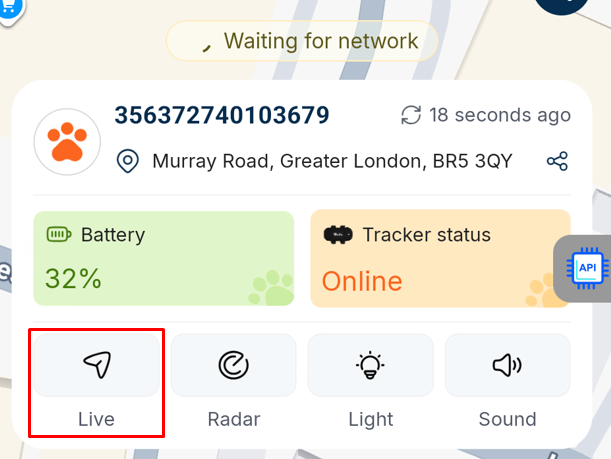
3. Once successfully enabled, you will see the tracker card replaced by a live mode pop-up. You can also use this pop-up to enable light & sound to know when your pet is close, or to find them in the dark. Please note, you may experience a small delay enabling the light or sound after the tracker goes into live mode; this is completely normal.
4. After 30 seconds, the tracker will automatically revert to regular tracking, and the pop-up will close. This is to conserve battery life, as live mode uses so much battery, and the priority is keeping your tracker online & tracking your pet in case live mode is left on accidentally.
5. If you haven't located your pet, just click the Live Mode button again to start a new live mode session.
Was this article helpful?
That’s Great!
Thank you for your feedback
Sorry! We couldn't be helpful
Thank you for your feedback
Feedback sent
We appreciate your effort and will try to fix the article