After you create a fence, you need to enable it on the pet or pets that you want to be alerted about when they enter or exit your new fence.
1. Go to the Pets tab. If you have multiple pets, select your pet at the top right.
2. Under Safety and Location, select the Select Virtual Fences item to go to the next step.
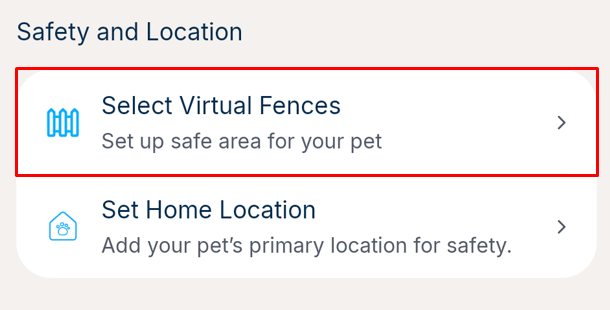
3. You should see a list of the fences in your account. Ticked fences are already enabled on your tracker.
4. On any unchecked fences, click the checkbox to enable the fence on the tracker. Or uncheck a box to disable a fence on this tracker.
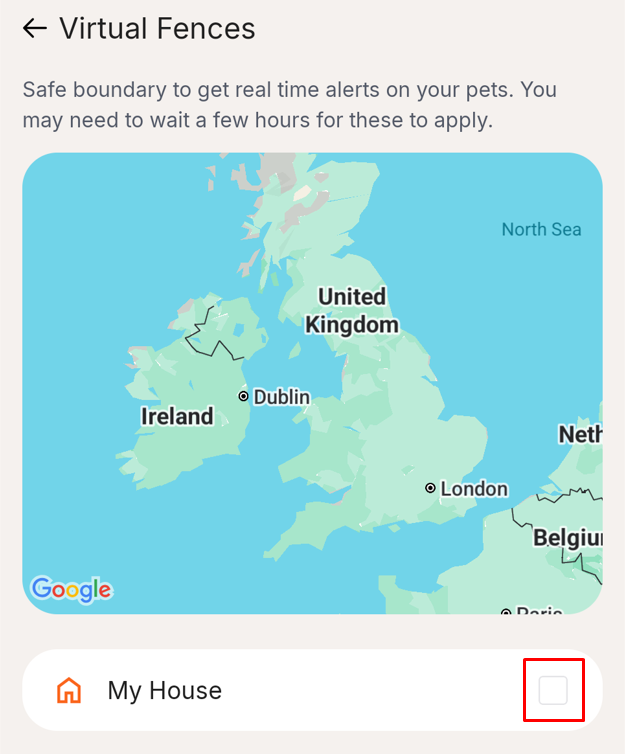
5. If the fence is enabled on your pet's tracker, you will see an orange tick appear. Please go back to the pet tab and change your pet to repeat this process for multiple pets.

Please note, it may take 12-24 hours for any fences being added or removed for the change to sync with your tracker.
Was this article helpful?
That’s Great!
Thank you for your feedback
Sorry! We couldn't be helpful
Thank you for your feedback
Feedback sent
We appreciate your effort and will try to fix the article